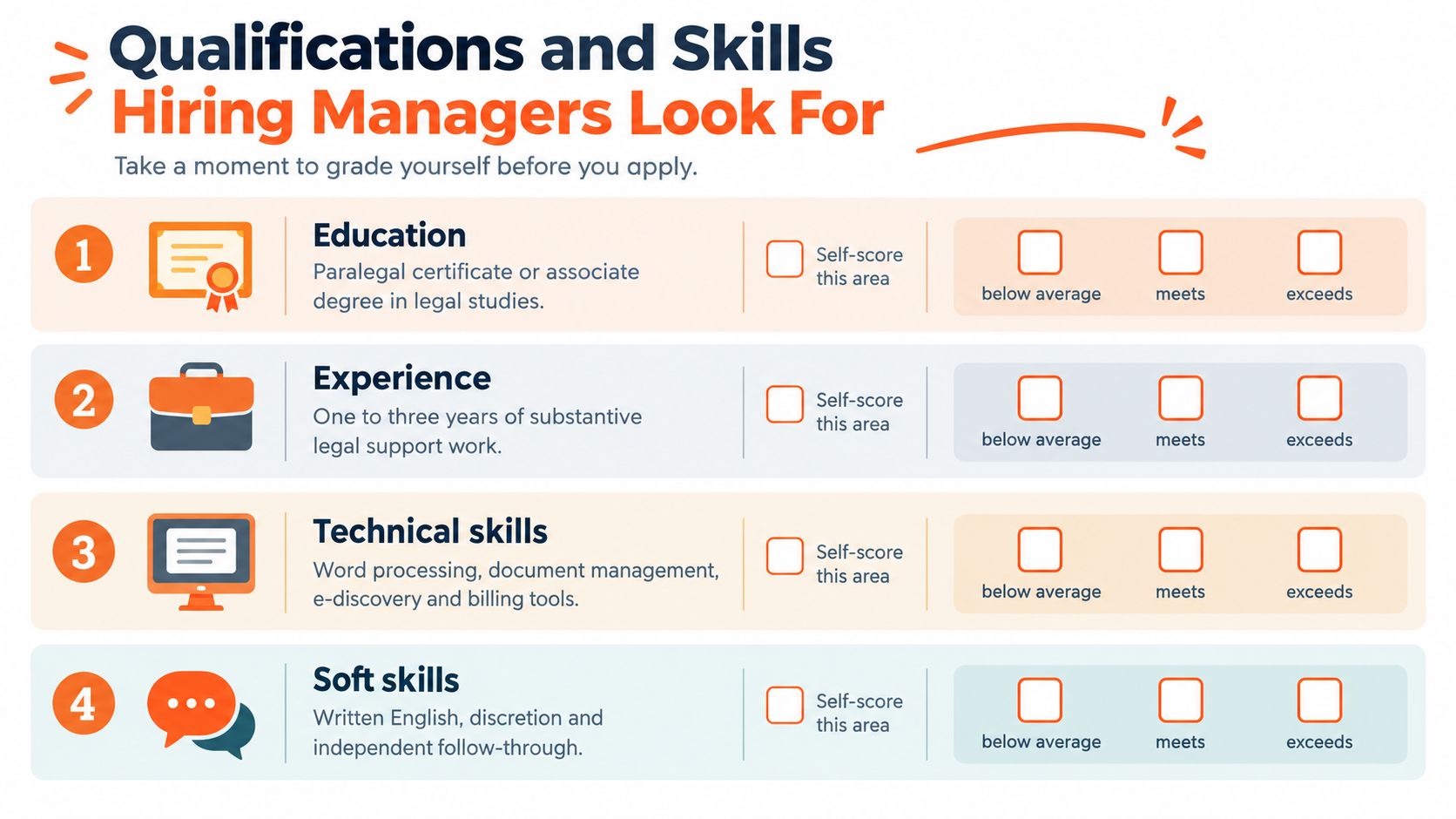
You may be looking at remote legal support vacancies and wondering whether your experience really matches the job duties of a legal secretary. Perhaps you already manage calendars, prepare documents, communicate with clients, or protect sensitive records, but you haven't worked inside a law firm. The role becomes easier to evaluate once you see what happens during an ordinary working day.
A legal secretary isn't a typist or receptionist. The position combines administrative coordination, document control, deadline tracking, client communication, records management, and supervised legal support. For remote candidates in Latin America, South Africa, and other supported Virtustant markets, understanding those workflows can help you tailor your CV, prepare for interviews, and identify roles that match your actual strengths.
A Day in the Life of a Legal Secretary
Tuesday begins with an inbox that already contains work from overnight. A legal secretary checks messages from attorneys, clients, witnesses, and court contacts, then compares them with the day's calendar. A hearing may have moved, a client may have sent a missing document, or an attorney may need a revised motion before a filing deadline.
The first priority isn't answering every message in arrival order. It's identifying what affects a court date, filing obligation, client commitment, or attorney decision. The secretary records urgent items, confirms which instructions are complete, and flags anything that needs legal judgment rather than administrative processing.

A working morning
By mid-morning, the secretary adjusts an attorney's calendar after a deposition changes time. The update must reach everyone affected, including the client, opposing counsel, court reporter, and internal team. A calendar entry that looks complete but lacks a location, video link, matter name, or time-zone detail can create confusion later.
Next comes document work. The attorney has marked revisions in a motion, and the secretary compares the latest version with the prior draft, checks names and formatting, confirms that referenced exhibits are present, and prepares the file for attorney review. The secretary doesn't decide the legal argument. The responsibility is to process the attorney's instructions accurately and make the document ready for approval.
The afternoon handoff
A client calls for an update. The secretary can explain the status of a requested document or confirm a meeting, but shouldn't offer an opinion about the likely legal outcome. If the question requires interpretation, the secretary records it clearly and routes it to the attorney or paralegal.
Later, the secretary checks a deposition transcript against the case file, notes missing pages or inconsistent names, and reports the issue. Before signing off, the secretary reviews tomorrow's deadlines, confirms filing receipts, checks unresolved messages, and makes sure the electronic matter folder is searchable.
The daily work falls into four connected areas:
- Legal document production, including drafting, proofreading, formatting, and filing support.
- Deadline and records management, including calendars, indexing, filing confirmations, and audit trails.
- Client and court communication, including professional updates, scheduling, and correspondence.
- Research and information support, including database searches, quotation checks, and retrieval of case materials.
Practical rule: A good legal secretary doesn't merely complete tasks. They leave the next person with a clear record of what changed, what remains open, and what must happen next.
What the Legal Secretary Role Actually Covers
A legal secretary performs a specialized administrative function. The role combines ordinary office coordination with legal-document and case-support work. The U.S. Bureau of Labor Statistics describes the occupation as requiring knowledge of legal terminology and procedures, while O*NET includes document preparation, case-file organization, courtroom forms, correspondence delivery, scheduling, invoicing, and records maintenance in its occupational description. O*NET's legal secretary task profile shows why the position extends well beyond reception or typing.
The easiest way to understand the role is to separate its responsibilities from those of nearby positions:
- General administrative assistant: manages office processes that may not require legal terminology or court procedures.
- Executive assistant: often focuses on senior-level scheduling, travel, meetings, and confidential business administration.
- Legal secretary: prepares and processes legal materials, supports matter administration, and coordinates legal deadlines under supervision.
- Paralegal: usually performs more substantive legal work, such as legal research, evidence review, analysis, and case-preparation support.
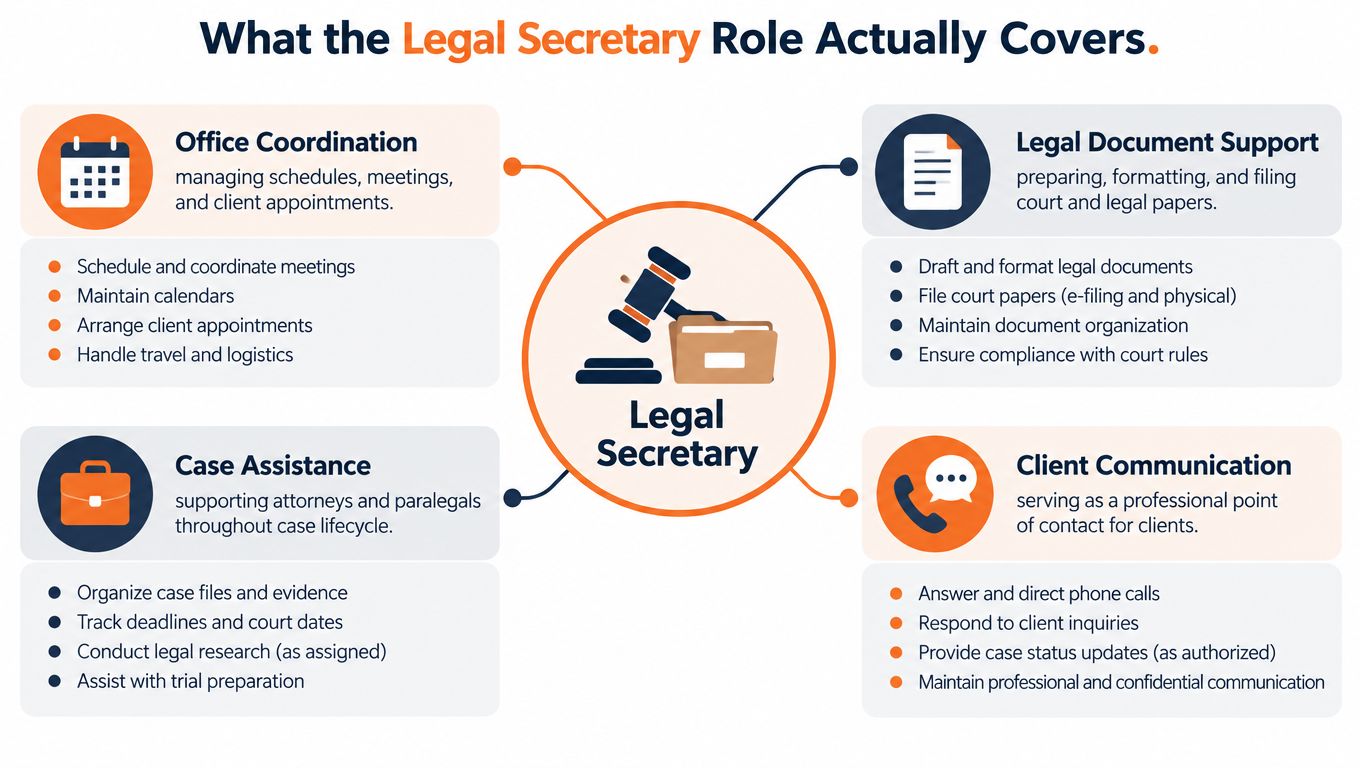
Four connected duty groups
Office coordination keeps people, meetings, and information aligned. This includes calendars, appointments, invoices, client lists, and communication records.
Legal document support covers the preparation, proofreading, formatting, processing, and distribution of court papers and formal correspondence. The secretary applies approved procedures but doesn't independently determine legal strategy.
Case assistance means maintaining matter files, retrieving documents, arranging deliveries, supporting hearings or depositions, and keeping administrative information current throughout the matter.
Client communication involves professional contact with clients, witnesses, courts, and other parties. The secretary may provide procedural updates, gather information, and route questions, but substantive legal advice belongs to the attorney.
The supervisory boundary matters, especially for remote hires. Legal secretaries can prepare and process materials, check completeness, and identify inconsistencies. Attorneys or paralegals retain responsibility for substantive legal judgment and formal legal decisions. That boundary protects the client and gives the secretary a clear escalation path when instructions are incomplete or an AI-generated draft appears uncertain.
Core Document Preparation and Drafting Tasks
Document preparation is a controlled workflow, not a race to produce a polished-looking file. A legal secretary may prepare summonses, complaints, motions, subpoenas, appeals, pretrial agreements, and formal correspondence under an attorney's or paralegal's supervision. The exact document depends on the practice area and matter, but the quality controls remain similar.
Start with controlled instructions
Before opening a template, confirm the matter name, parties, document type, due date, recipient, and approving attorney. If the instructions arrive in a short message such as “update the motion and send it out,” ask for the missing details rather than guessing. A neat document built on the wrong matter or outdated facts is still an error.
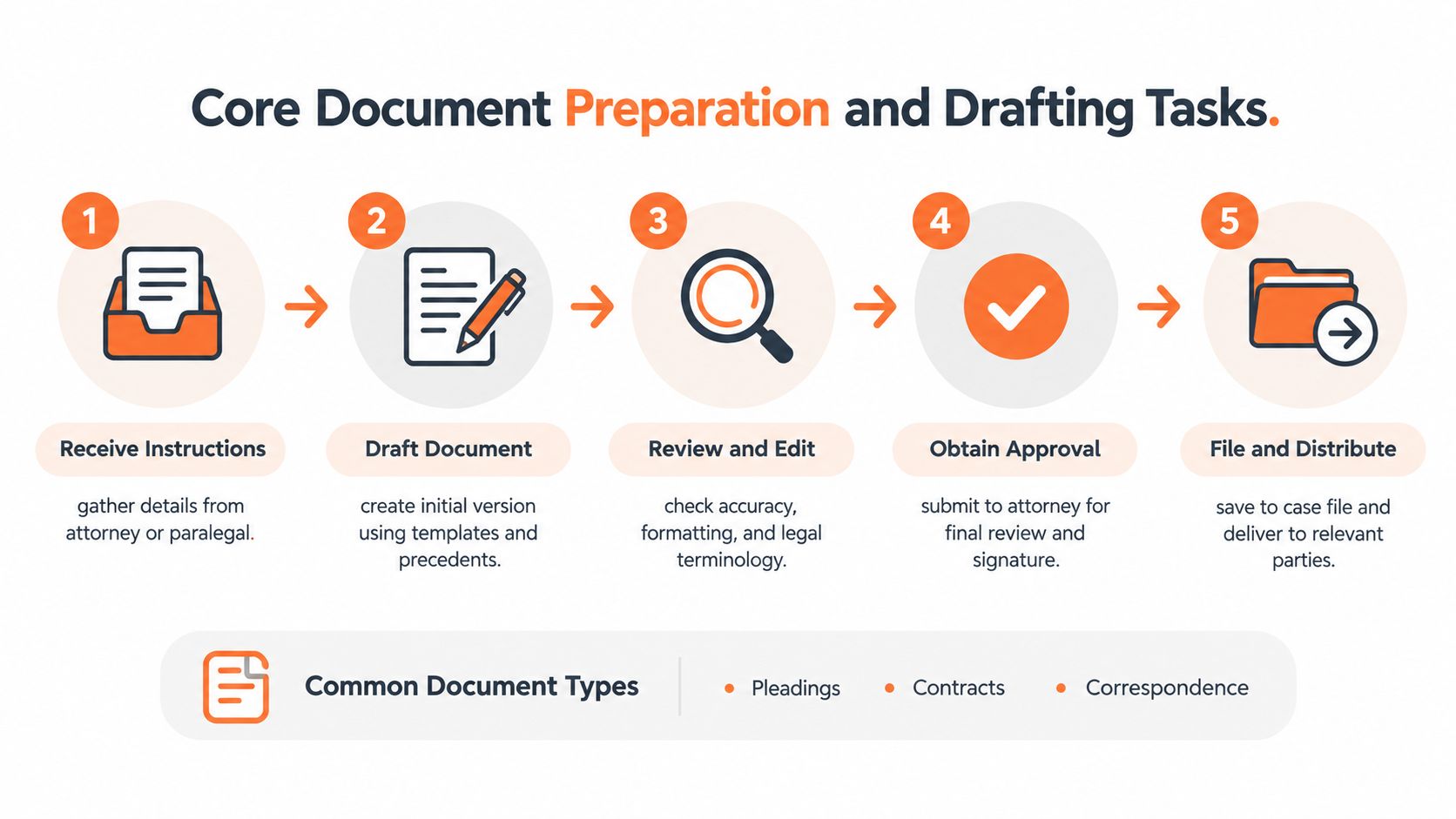
Use the firm's approved template or precedent. Then work through a disciplined sequence:
- Receive and clarify instructions. Record the source, requested action, deadline, and unresolved questions.
- Create the draft. Use the approved template, matter information, and correct document version.
- Review the content mechanically. Check party names, dates, signature blocks, citations, quotations, exhibit references, page numbering, and formatting.
- Obtain approval. Send the draft to the attorney or paralegal for substantive review and signature.
- File and distribute. Save the approved version in the matter repository, complete the required filing or delivery step, and record confirmation.
The errors new hires miss
New secretaries often focus on spelling while overlooking document control. A wrong party name, incomplete service detail, mismatched exhibit, incorrect citation, or old revision can cause rejection or delay. A missed filing date can affect procedural rights, so proofreading must include both language and process.
Tools commonly associated with this work include Microsoft Word, PDF software such as Adobe Acrobat, document-management repositories, and legal systems such as HotDocs. O*NET also identifies research and information-retrieval tools including LexisNexis, Westlaw, and PACER, where the position requires them. The Bureau of Labor Statistics overview of secretarial duties supports the importance of proofreading, legal terminology, filing, and deadline monitoring.
Use consistent file names, preserve prior versions according to firm policy, and record when and where a document was filed. If a question changes the legal meaning of the document, stop and escalate it. A legal secretary's value comes from reliable processing, not from independently giving legal advice.
Deadlines, Calendars, and Records Management
The strongest legal secretaries treat the file system and calendar as a control system. They maintain matter calendars, schedule hearings and depositions, organize attorney appointments, communicate with clients and witnesses, and keep correspondence accessible. The BLS describes legal secretaries as responsible for filing and indexing legal materials, proofreading documents, monitoring filing deadlines, maintaining calendars and client lists, and scheduling appointments and hearings. The BLS career guidance on law-firm support provides the occupational context for these duties.
A remote workflow adds another layer. The secretary must document updates so colleagues working in another location or time zone can understand the current status without relying on an informal conversation. Candidates coordinating with U.S. teams should also understand how South American time zones affect remote work, especially when a posting specifies fixed working hours.
What reliable control looks like
A current matter should have a searchable file structure, a deadline calendar, a correspondence history, and a clear record of filing activity. Incomplete indexing makes evidence and messages difficult to retrieve. An unsynchronized calendar can lead to a missed hearing. Inaccurate time entries can affect client billing.
Federal filing rules offer a useful illustration. Under one cited rule, when confidential treatment is requested in certain proceedings, both a confidential version and a public version may be required. The confidential version must be clearly marked, protected information must be removed from the public version, and the public version must be filed within three business days after the confidential filing. The cited federal rule on confidential and public filings demonstrates why naming, redaction, access control, and deadline verification are practical responsibilities rather than optional tidiness.
| Record Category | Example Items | Risk If Mishandled |
|---|---|---|
| Court filings | Pleadings, motions, filing receipts | Rejection, delay, or uncertainty about whether submission was completed |
| Calendar records | Hearings, depositions, filing deadlines | Missed appearances or late procedural action |
| Client communications | Emails, call notes, requested documents | Conflicting information, poor follow-up, or incomplete instructions |
| Matter files | Evidence, correspondence, forms, transcripts | Slow retrieval and an unreliable case history |
| Billing records | Time entries, invoices, expense information | Inaccurate client billing or incomplete financial records |
For practical ideas on naming conventions, folder structures, and searchable digital records, see how Tintd helps. Treat any external method as a starting point, then follow the firm's retention, access, and security policies.
Skills, Software, and Credentials That Stand Out
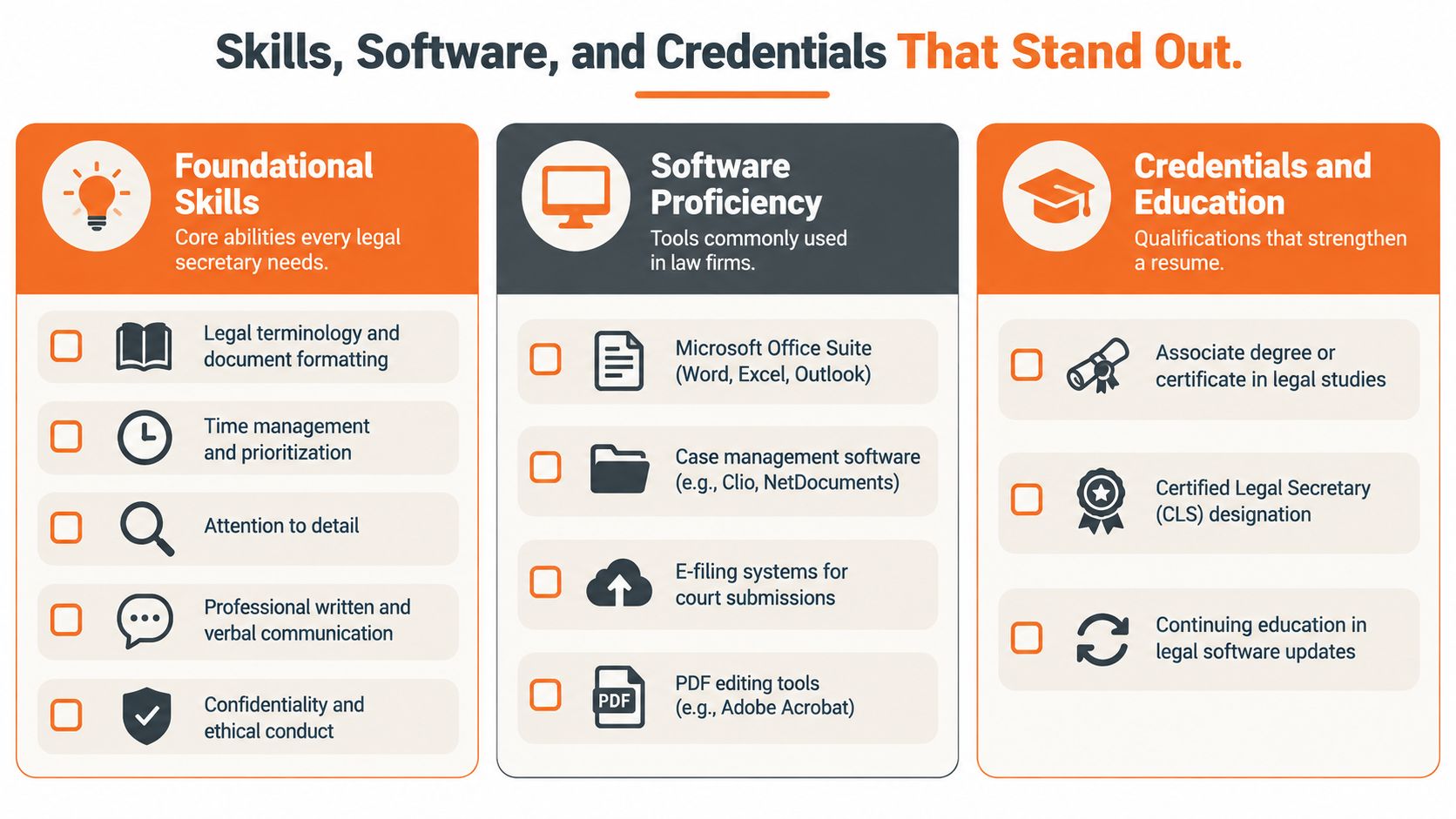
Remote legal-secretary applications are stronger when they show evidence of capability, not just a list of personality traits. Organize your preparation into three layers: legal foundations, software fluency, and remote communication discipline.
The capability map
Foundational skills include legal terminology, document conventions, careful proofreading, confidentiality, prioritization, and professional communication. A candidate who has worked in healthcare, finance, customer support, or general administration can translate existing experience into legal language by showing how they handled sensitive records, competing deadlines, and formal correspondence.
Software proficiency should be specific. Mention Microsoft Word features you use, such as tracked changes, styles, templates, tables, and PDF conversion. Add Excel for time or invoice records, Outlook or another calendar platform, Adobe Acrobat, document-management systems, e-filing portals, and any case-management tools you know. Don't claim experience with LexisNexis, Westlaw, PACER, HotDocs, or a named platform unless you can discuss how you used it.
Research capability varies by role. Some positions need database searches and citation checks, while others focus almost entirely on document production and scheduling. Read the posting carefully and match your profile to the stated workflow.
A remote candidate should also demonstrate clear written English, asynchronous updates, time-zone coordination, and reliable status reporting. Bilingual English-Spanish communication can be useful for LATAM candidates when the role involves clients or teams across languages, but it doesn't replace the need for precise professional English.
A practical self-check
Before applying, confirm that your profile can answer these questions:
- Documents: Can you describe a controlled process for drafting, proofreading, revising, and filing?
- Records: Can you explain how you name, index, protect, and retrieve sensitive files?
- Calendars: Can you show how you track deadlines and communicate schedule changes?
- Tools: Can you identify the systems you use and the tasks you complete in each?
- Judgment: Can you explain when you stop, ask for clarification, and escalate?
- Remote work: Can you provide concise updates across time zones without constant supervision?
Credentials can strengthen the application, including a certificate, associate-level legal studies, or a professional designation such as Certified Legal Secretary. They should support demonstrable skills rather than replace them. For a broader comparison with general administrative work, review what an administrative assistant does and then tailor your CV toward the legal-document responsibilities that distinguish this role.
Handling AI Tools Without Breaking Confidentiality
AI is already relevant to legal-secretary work because teams may use it for transcription, summarization, document search, proofreading, and drafting. The safe question isn't whether AI is fast. It's whether the tool, data flow, review process, and approval path are appropriate for the matter.
Recent American Bar Association guidance emphasizes that lawyers must understand how AI systems handle data, protect confidential information, exercise independent judgment, and apply human oversight. The ABA discussion of legal ethics and AI also highlights the risk that confidential inputs may resurface in outputs or create problems across screened matters.
A defensible remote workflow
Use AI only within the firm's approved environment. Before processing anything, confirm the permitted tool, data-retention settings, user permissions, and whether the matter allows that type of assistance. Public chatbots shouldn't receive client names, facts, privileged communications, unredacted contracts, medical information, or other identifying details unless the responsible legal team has expressly approved the process.
For an approved task:
- Minimize the data. Remove names, account details, unnecessary facts, and identifying information where possible.
- Check the settings. Confirm retention, access, storage, and account controls.
- Review every output. Verify names, dates, quotations, citations, defined terms, and deadlines against the source.
- Preserve the audit trail. Record the tool, source document, reviewer, and final approved version according to policy.
- Obtain sign-off. An attorney or authorized reviewer must approve substantive text before it reaches a client, court, or opposing party.
Escalation habit: If an AI output sounds plausible but you can't verify it, don't forward it. Mark the uncertainty, preserve the source, and ask the responsible attorney or paralegal.
For remote candidates, this is an interview opportunity. Explain that you value approved software, redaction, access controls, human review, and escalation over unverified speed. That answer shows judgment, confidentiality awareness, and respect for the supervisory boundary.
Sample Job Description and How It Compares to a Paralegal
A useful sample posting might read as follows:
Legal Secretary Support attorneys and paralegals with legal document preparation, proofreading, formatting, filing coordination, calendar management, client communication, case-file maintenance, invoice and time-entry support, and deadline tracking. Prepare correspondence and court materials under supervision. Maintain organized electronic records, document filing confirmations, coordinate hearings and depositions, and communicate professionally with clients, witnesses, and court contacts. Experience with Microsoft Word, Adobe Acrobat, document-management systems, electronic filing, and legal research databases is useful. Strong written English, confidentiality, attention to detail, and reliable remote communication are required. Availability should align with the team's working hours and matter deadlines.
This wording describes administrative-plus legal support without assigning independent legal analysis. Candidates should compare each posting with their real experience rather than applying to every role containing the word “legal.”
Legal Secretary vs Paralegal at a Glance
| Dimension | Legal Secretary | Paralegal |
|---|---|---|
| Primary focus | Administrative coordination and supervised legal-document support | Substantive legal and case-preparation support under attorney supervision |
| Document work | Formats, proofreads, processes, files, and distributes documents | May draft pleadings, discovery materials, summaries, and other substantive work |
| Research | Retrieves information, checks quotations or citations, and supports searches where assigned | Conducts deeper legal research and analyzes authority for the case team |
| Client interaction | Schedules, gathers information, provides procedural updates, and routes questions | May conduct more detailed case-related interviews and assist with substantive preparation |
| Records and deadlines | Maintains calendars, matter files, correspondence, filing confirmations, and administrative records | Uses case information to support discovery, evidence review, and litigation preparation |
| Credentials | Relevant administrative experience, legal training, certificates, or demonstrable workflow skills | Often requires more specialized paralegal education or experience, depending on the employer |
The distinction matters for LATAM candidates because titles vary between employers. A posting called “legal assistant” may combine secretary and paralegal responsibilities, while another may use “legal secretary” for a highly technical litigation-support position. Read the verbs carefully. “Schedule,” “format,” “file,” and “maintain” usually indicate secretarial coordination. “Analyze,” “draft discovery,” “review evidence,” and “research legal issues” suggest broader paralegal-level work.
Next Steps for LATAM Candidates
Start with your profile, not the application form. Describe the workflows you can perform: legal terminology, document formatting, tracked revisions, calendar control, records indexing, client communication, PDF handling, e-filing preparation, and confidentiality. Add the software you know and state your English level accurately.
Then browse current remote openings and compare the wording of real postings with your experience. Look for schedules, required tools, practice areas, language expectations, and whether the role focuses on document support, intake, calendaring, or paralegal-level research. You can also review sites for finding remote work to understand how different platforms present opportunities.
Prepare three interview examples. One should show how you caught or prevented a document-control error. Another should show how you tracked a deadline or coordinated across time zones. The third should explain how you protected confidential information or handled an uncertain AI-assisted output. If you need context on court-related administrative processes in another jurisdiction, what authorized centers offer in Dubai is an example of a resource that can help clarify the services surrounding court administration.
Short FAQ
Is prior U.S. law-firm experience required? Not always. Transferable administrative experience can help when you demonstrate legal terminology, document discipline, confidentiality, and familiarity with supervised workflows.
What English level is expected? It depends on the posting and client contact involved. Roles with frequent written communication, calls, and document preparation generally require confident professional English.
How is remote legal-secretary pay structured? Compensation depends on the employer, role scope, experience, schedule, location, and engagement arrangement. Review the specific posting rather than relying on a general figure.
Virtustant Jobs connects qualified candidates with remote opportunities, including legal and administrative support roles where document management, calendaring, client communication, and records control matter. Create your Virtustant Jobs profile, complete your application information, and browse openings that match your legal-secretary skills and remote-work readiness.